A few years back, this was one of the easier questions in PC building. Eight gigs was standard, twelve was generous, and sixteen was something you only needed if you were doing actual professional rendering work. That framing is dead now, and I don’t think enough people buying GPUs today have fully clocked how much the ground shifted underneath them.
Why VRAM breaks differently than every other spec
Most performance bottlenecks in a PC are gradual. A slightly weaker CPU costs you a few frames here and there. A slower SSD adds a couple seconds to a load screen. VRAM doesn’t degrade gracefully like that, and that’s the part that catches people off guard. When a game’s VRAM demand exceeds what your card actually has, you don’t get a smooth decline in quality — you get sudden stuttering, hitching when you move into a new area, textures visibly downgrading in real time as the game scrambles to keep up. It’s a cliff, not a slope, and it’s genuinely obvious the moment it happens.
Worse, there’s no setting you can lower to fix it once you’re already there. Turn down shadows, turn down anti-aliasing, sure — those help with raw rendering load. But an undersized VRAM pool is a hardware ceiling, not a software one. The only real fix once you’ve hit it is a new graphics card. That’s what makes this spec worth understanding properly instead of skimming past it on a spec sheet.
It’s also the one component you genuinely can’t upgrade later
This is the detail that should change how people think about GPU shopping. System RAM is trivial to add to later — open the case, slot in another stick, done. VRAM doesn’t work that way. Whatever capacity is soldered onto the card the day you buy it is the capacity you’re stuck with until you replace the entire GPU. There’s no add-on, no expansion slot, no workaround. The number on the box at purchase time is the number you’ll still be living with in three years, which is exactly why it deserves more attention than people typically give it.
What the numbers actually look like by resolution
The consensus across current testing has settled into a fairly consistent shape, and it’s worth having as a mental reference point:
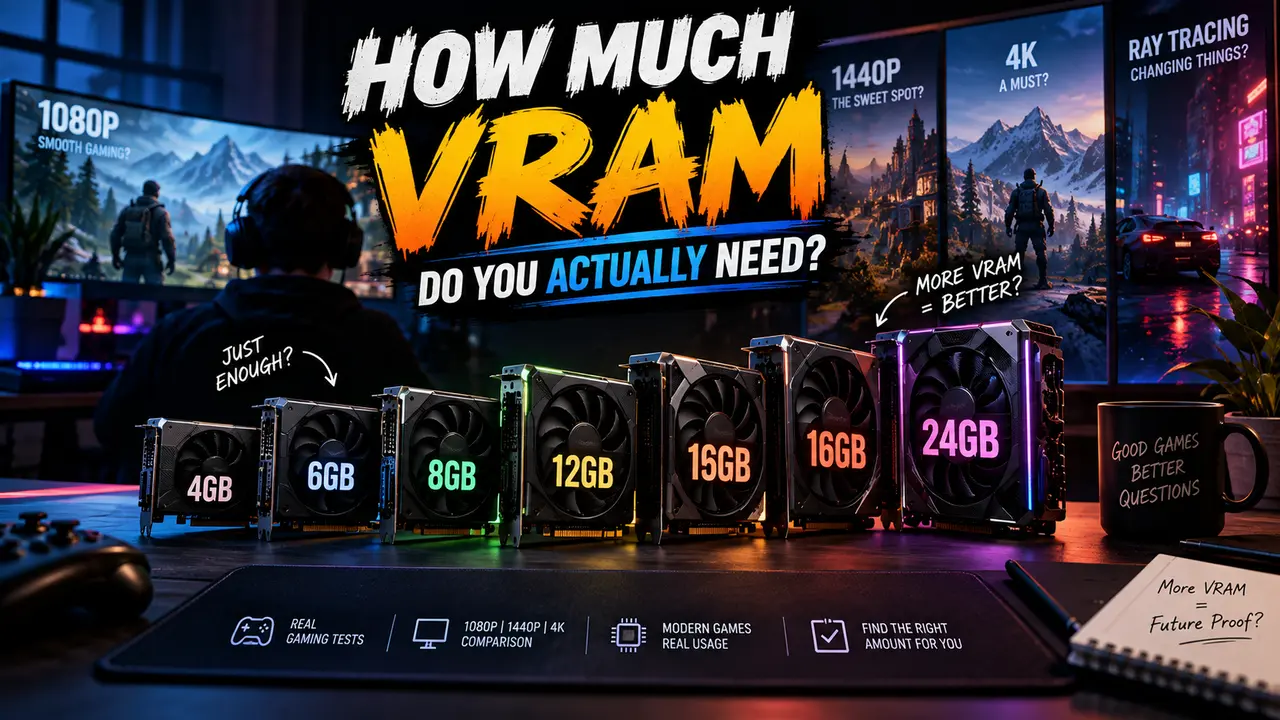
At 1080p, 8GB remains a workable floor, particularly if you’re playing competitive or esports titles — those tend to stay lightweight, often using under 6GB of VRAM even at 4K, because they’re built to run on a huge range of hardware rather than showcase graphical fidelity. But 8GB at 1080p is increasingly a short-runway choice for demanding AAA games specifically. Several 2025-and-2026 releases now exceed 8GB at ultra settings even at this resolution, so if you’re buying new and planning to hold onto the card for three-plus years, 12GB is the safer target even at 1080p.
At 1440p, which has become the default sweet-spot resolution for most gaming builds, 12GB is the realistic floor rather than the comfortable buffer it used to be. VRAM usage typically jumps 30 to 50 percent over 1080p at this resolution, and 16GB has emerged as the actual sweet spot if you want to enable ray tracing and high-resolution texture packs without constantly managing settings to stay under a ceiling.
At 4K, 16GB is the minimum worth considering, and 24GB gives genuinely comfortable headroom for ultra texture settings and whatever the next couple years of releases throw at it. Frame buffers alone eat more memory at 4K resolution before you’ve even loaded a single high-res texture pack.
The games that actually reveal where the ceiling sits
Numbers on a chart are one thing; specific games are more convincing. Black Myth: Wukong runs around 7 to 8GB without ray tracing at 1080p — already leaving almost no headroom on an 8GB card — and pushes past 10GB the moment any ray tracing gets enabled at that same resolution. Cyberpunk 2077 at 1080p with ray tracing on ultra lands in similar territory, and on an 8GB card specifically, you’ll see automatic texture downgrades and noticeable stutter as a direct result.
Microsoft Flight Simulator 2024 has developed a reputation as the current VRAM king for a reason — it’ll saturate a 12GB card at 1440p on High settings, which is a genuinely useful data point since it shows even the “safe” 12GB tier has real limits with the right game. And it’s not just an outlier; Monster Hunter Wilds regularly pushes past 12GB too, and titles like The Last of Us Part II and Star Wars Outlaws climb past that threshold at maximum settings as well.
Maybe the clearest signal of where the industry itself thinks this is heading: Indiana Jones and the Great Circle’s official system requirements list 8GB as the bare minimum, 12GB as recommended for 1440p, and 16GB for native 4K on Nvidia hardware. When a developer’s own spec sheet draws the lines that clearly, that’s not marketing exaggeration from a hardware reviewer — that’s the actual target the game was built around.
What the current GPU market actually offers at each tier
The market has adjusted to reflect all of this, sometimes in ways that upend old assumptions. The RTX 5070 ships with 12GB of GDDR7, landing right at the 1440p floor. AMD’s RX 9070 and RX 9070 XT both come with 16GB, putting them squarely in “don’t think about VRAM again for years” territory. Intel actually broke the old budget-tier assumption entirely — the Arc B580 launched at $310 with 12GB, inverting the old rule that budget cards default to 8GB.
One especially useful comparison sits within AMD’s own lineup: the RX 9060 ships with 8GB, while the RX 9060 XT comes in both 8GB and 16GB variants off essentially the same core. If you’re cross-shopping those two and the price gap between the 8GB and 16GB versions is modest, the 16GB variant is the more sensible long-term buy nearly every time — you’re paying a little more upfront to avoid hitting a wall that has no fix later.
A quick note on a confusing Windows number
Worth clearing up while we’re here, because it trips people up regularly: Windows’ Device Manager sometimes displays a figure called “Shared GPU Memory,” which can show a dramatically higher number than your card’s actual VRAM. That combined figure includes a chunk of system RAM that Windows reserves as a slow overflow buffer — it is not real VRAM, and it performs nothing like real VRAM. The number that actually matters for game performance is the dedicated VRAM figure printed on your GPU’s actual specifications. If a game exceeds that dedicated figure and starts leaning on the shared overflow instead, you’ll get the exact same stuttering and texture problems described above, regardless of what the inflated combined number in Device Manager suggests.
Matching VRAM to how you actually play
If your library is mostly competitive shooters and esports titles, 8GB genuinely remains fine, and you’d be paying for headroom you’re unlikely to use. If you’re playing a mix of current AAA releases at 1080p or stepping up to 1440p, 12GB is the realistic floor worth building around, with 16GB as the number that buys genuine peace of mind if you plan to hold the card for several years. If you’re gaming at 4K, running heavy texture mods, or you just don’t want to think about this issue again until your next full upgrade cycle, 16GB should be your minimum target, with 24GB reserved for people chasing maximum settings on the newest releases as a matter of course.
At The End
VRAM doesn’t move the needle on frame rate the way a faster GPU core does — if a game comfortably fits inside your available VRAM, adding more won’t make it run faster. But the moment a game’s needs exceed what you’ve got, performance doesn’t dip gently, it falls off a cliff, and there’s no setting that brings it back. Buy based on where you’ll actually be gaming in two or three years, not just where you are today, because unlike nearly everything else in this hobby, this is the one component you don’t get to fix later without buying a whole new card.