SSD Buying Guide 2026
Storage might be the most over-marketed, under-explained component on any build sheet. The spec sheet throws numbers at you — sequential read speeds, PCIe generations, DRAM cache, TLC versus QLC NAND — and most of it reads like it should matter enormously. Some of it does. A lot of it doesn’t, at least not for the way you’re actually going to use the drive. Let’s sort out which is which.
PCIe Gen5: the speed everyone talks about, and the frame rate it won’t give you
Here’s the thing nobody selling you a Gen5 drive wants to say out loud first: it will not make your games run faster. Not one extra frame. Frame rate comes from your GPU, CPU, and RAM — storage affects load times and asset streaming, full stop, and even there the gap between a good Gen4 drive and a flagship Gen5 drive is smaller than the spec sheet suggests.
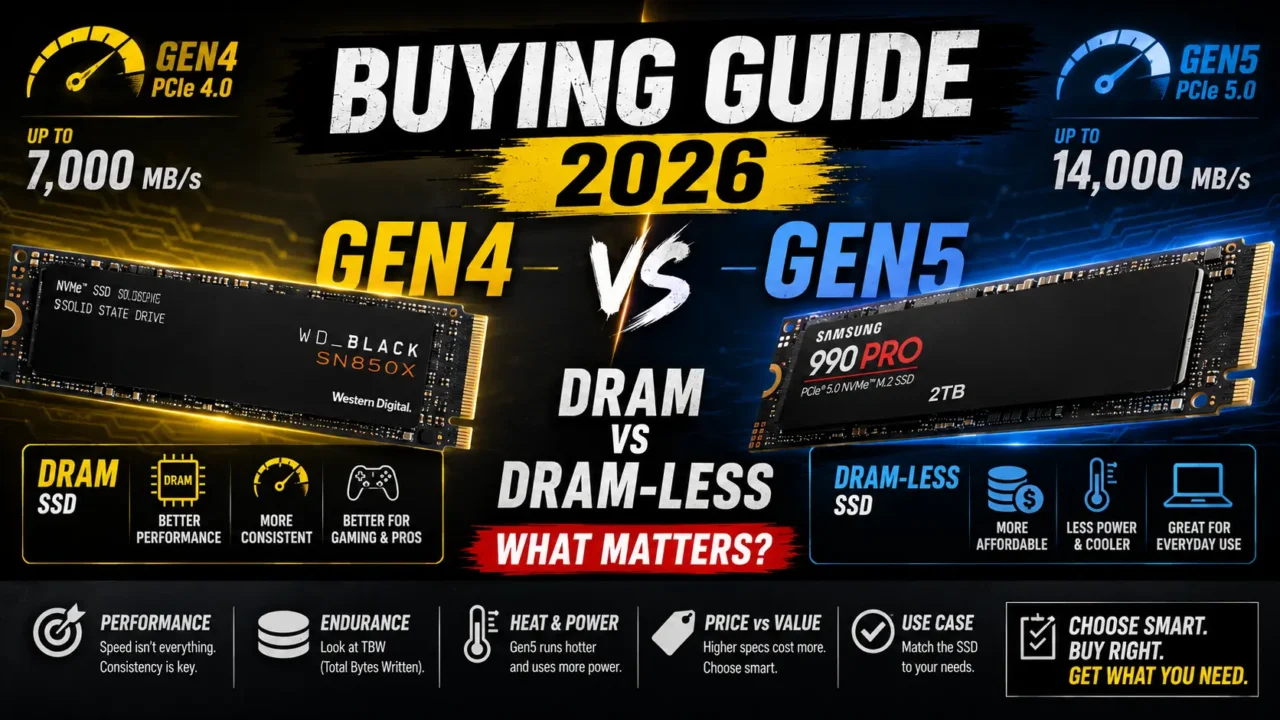
On paper, the difference looks massive. Flagship Gen5 drives like the Crucial T705 or Corsair MP700 Pro push sequential reads north of 12,000 MB/s, roughly double what a strong Gen4 drive like the Samsung 990 Pro or WD Black SN850X manages at around 7,000 to 7,400 MB/s. In practice, independent load-time testing has repeatedly found the real-world gap between a fast Gen4 and fast Gen5 drive comes in under two seconds — often within the margin of error of the test itself. I’ve seen a few different outlets land on essentially the same conclusion independently, which tells me it’s not a fluke.
There are two catches with Gen5 that don’t show up on the spec sheet. First, heat: these drives run hot enough that most throttle under sustained load without active cooling, which partially eats into the performance advantage you paid for in the first place. Second, and more subtly, is that a good chunk of Gen5’s promised benefit — DirectStorage asset streaming straight from SSD to GPU memory — is still selectively implemented across games in 2026. It helps texture pop-in during fast traversal in the handful of titles that lean on it aggressively. Everywhere else, that extra bandwidth just sits there, unused, like a sports car stuck in city traffic.
So who should actually buy Gen5? Content creators and anyone regularly moving huge files — multi-terabyte video scratch disks, full library clones — where sequential bandwidth translates directly into time saved. For everyone else, a quality Gen4 drive at a noticeably lower price, with none of the cooling headaches, is the smarter buy. Save the premium for a better GPU or another 16GB of RAM. That money will do more for your actual gaming experience than doubling your storage bandwidth ever will.
DRAM vs DRAM-less: the one that actually affects daily feel
This is the distinction I think matters more than Gen4-versus-Gen5, and it gets a fraction of the attention. Every SSD needs to track exactly where each piece of data physically lives on the NAND — that’s the flash translation layer, essentially an address book the controller checks constantly. A DRAM SSD keeps that address book in a small, dedicated, extremely fast memory chip. A DRAM-less drive either stores it directly on the NAND itself, or borrows a small slice of your system RAM through something called Host Memory Buffer, HMB for short, usually somewhere between 20 and 256MB depending on the drive.
HMB has genuinely gotten good. Modern implementations reportedly hit cache-hit rates as high as 98 percent with as little as 16MB borrowed, which is a big part of why the practical gap between DRAM and DRAM-less drives has narrowed so much for typical gaming and desktop use. For a single-player game booting up and loading from a mostly-idle drive, you’d struggle to tell the two apart in a blind test.
Where DRAM pulls meaningfully ahead is under sustained, mixed pressure — the stuff that doesn’t show up in a quick benchmark but absolutely shows up in daily use. Installing a 200GB-plus modern AAA title, shader compilation on first launch, texture streaming during fast open-world traversal, running the drive as your primary volume while also handling Windows, background downloads, and a dozen open browser tabs — that’s where DRAM-less drives start to show their seams, sometimes 15 to 25 percent behind on random 4K reads, which is the metric that actually governs how snappy a system feels rather than how fast a single big file copies.
My honest take, having watched this argument happen across a dozen different testing outlets: DRAM is worth paying for on your primary OS-and-games drive, especially if you’re the type who keeps a system installed for years and layers on shader caches, mods, and half your Steam library over time. For a secondary bulk-storage drive holding stuff you rarely touch, DRAM-less with decent HMB is money you don’t need to spend.
NAND type matters too, even though it rarely gets billed as the headline spec
Quick note here because it trips people up: don’t assume DRAM automatically means “buy it, skip everything else.” A QLC drive with DRAM can still underperform a well-built TLC drive without DRAM, particularly on sustained write endurance — QLC’s four-bits-per-cell design trades some longevity and consistency for higher capacity at a lower price. If you see a suspiciously cheap high-capacity drive, check whether it’s QLC before assuming DRAM alone makes it a safe primary pick.
How much should you actually buy
Game sizes have gotten genuinely absurd. Big open-world AAA titles routinely hit 100 to 150GB installed, live-service shooters sit in the 80 to 120GB range before patches inflate them further, and a modded Skyrim or Cities: Skylines install can quietly balloon past that without you noticing until you’re staring at a “disk full” warning mid-download. One terabyte is the realistic floor for a primary gaming drive in 2026, not the comfortable ceiling it used to be. If you’re the type who keeps more than four or five big titles installed simultaneously, or you do any recording and streaming on the side, look at 2TB instead of talking yourself into “I’ll just uninstall things when I need space.” You won’t, and you know it.
Putting it together
If I were speccing a drive for a typical gaming build right now, here’s where I’d land: a 1TB or 2TB PCIe Gen4 NVMe SSD with DRAM cache, from a name you trust — the Samsung 990 Pro and WD Black SN850X both keep coming up across independent testing for good reason. Skip Gen5 unless you’re doing serious content creation work alongside gaming, in which case the Crucial T705 with a proper heatsink earns its premium. And if you’re adding a second drive purely for bulk game storage, a DRAM-less Gen4 drive with solid HMB implementation is genuinely fine — put your money toward DRAM on the drive doing the heavy lifting, not the one holding your backlog.
The bottom line
The SSD market wants you to chase the biggest number on the spec sheet, but that number — sequential read speed — is exactly the one that matters least for how a gaming PC actually feels day to day. Prioritize DRAM presence and NAND quality over PCIe generation, buy more capacity than feels strictly necessary right now, and let the marketing around Gen5 sell to the people actually moving terabytes of footage for a living. For the rest of us, it’s a solved problem that costs less than the hype suggests.